Retro Consoles: Systems and Games
 by
in
by
in
A retro console comes with its own game library, controller, display signal, and way of playing together. People return to these systems for the games, the hardware, or the shared memories around them.
“Retro” has no fixed cutoff. Some players mean cartridge systems from the 1980s and 1990s; others include the first PlayStation, Dreamcast, or early online consoles. Here, a retro console means older hardware with a distinct library or way of playing that can take extra effort to access today.
The console is only one part of a retro setup. The display, controller, cables, region, memory card, battery, and game version all affect play. Re-releases are convenient, original hardware keeps the physical setup, and emulation can add features that were not available on the original system.
Console families that shaped home gaming
| System family | Signature era | What it represents |
|---|---|---|
| Atari 2600 and early cartridge systems | Late 1970s and early 1980s | Interchangeable games on a home television. |
| NES / Famicom and Master System | 1980s | Home console libraries, recognizable characters, and regional competition. |
| Game Boy and other handhelds | Late 1980s onward | Portable play, compact screens, and games designed for interruption. |
| Mega Drive / Genesis and Super Nintendo | Early to mid-1990s | Richer 2D action, music, role-playing, and sports. |
| PlayStation, Nintendo 64, Saturn | Mid-to-late 1990s | Disc media, 3D worlds, and competing approaches to graphics. |
| Dreamcast, PlayStation 2, GameCube, Xbox | Early 2000s | Network features, larger worlds, DVDs, and a new console market balance. |
These labels summarize broad shifts, not strict generations shared by every region. A system might arrive first in Japan, later in North America, and at a different time or under a different name elsewhere. Local availability shaped which consoles became familiar.
Original hardware, re-releases, and emulation
Original hardware
Playing on the original console preserves its physical controller, boot sequence, cartridge or disc format, and many timing characteristics. That can be valuable for collectors, speedrunners, and players interested in the original setup. Older hardware may need cleaning, replacement cables, memory batteries, or repair. Some components are increasingly difficult to source, and transporting a console can put strain on aging connectors.
Official re-release
A compilation, mini-console, remaster, or digital edition can make a game easier to access. It may include save states, rewind, display filters, remappable controls, or a selection of titles in one menu. These are meaningful conveniences. They can also alter sound, aspect ratio, timing, localization, or multiplayer support. A re-release is an interpretation of the original software, even when its changes are subtle.
Emulation
Emulation reproduces a console’s behavior through software. It can make rare systems and games easier to inspect, support flexible displays, and preserve many play patterns. Accuracy varies by emulator, game, and settings. Input latency, audio behavior, video scaling, and controller mapping affect how close the result feels. Emulation can preserve access, but it does not automatically recreate the physical experience of a cabinet or console.
Displays and controls are part of the game
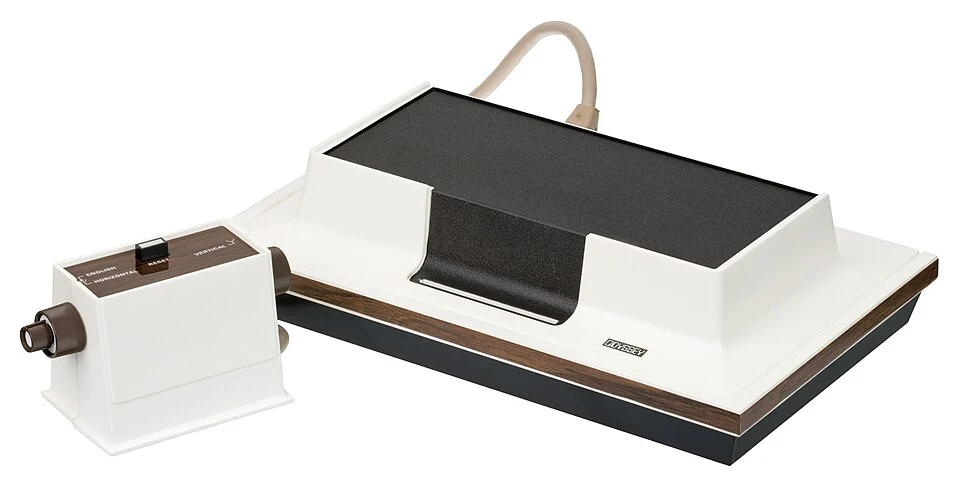
Many older systems were designed for CRT televisions. Scan lines, phosphor response, composite video, and screen curvature affected how pixels blended and how motion appeared. A modern flat panel displays the same image differently. Upscalers and filters can approximate some visual qualities, while a clean digital signal may improve clarity. Neither is universally correct; the game and player shape the choice.
Aspect ratio is important. Stretching a 4:3 image to fill a widescreen display can distort characters and game geometry. A border or pixel-perfect scaling preserves proportions but uses less screen area. Some games used visual tricks designed for a CRT and can look unexpectedly harsh on a modern display. Hardware or software scaling can help, but may add processing delay.
Controller shape changes the feel of an action. A D-pad, analog stick, pressure-sensitive button, shoulder trigger, trackball, or light gun affords different movement and precision. Third-party adapters can add modern controllers to old systems, but button mapping and analog response may not match the original. A game designed around a special peripheral may lose its central mechanic when that peripheral is absent.
Regional systems, games, and naming
Console history is not identical around the world. International libraries were shaped by licensing, cartridge and disc formats, video standards, and language support. Imported hardware may need a compatible power supply or display connection; a release from one market can also differ from the version an enthusiast sees in a foreign manual or video.
Regional libraries can tell a different story about what a system meant. A platformer, football game, arcade conversion, or RPG might dominate one market and be rare in another. Collectors may value a local box or manual; players may prefer a language they can read. The region is a useful part of the game’s identity rather than a technical detail to ignore.
Handhelds raise additional issues. Cartridge batteries may retain save data, screens may fade or develop lines, and replacement parts can affect color or brightness. Restoring a handheld may preserve play while changing the exact feel of its original display. Documentation and careful repairs help keep these systems usable.
Collecting versus playing
Collecting focuses on ownership, condition, packaging, rarity, and a physical connection to a period. Playing focuses on reliable access, comfortable controls, and the ability to return to a game. One person may care about both; another may prefer a digital library. A complete-in-box edition and a modern port serve different purposes.
Condition is not the same as playability. A pristine cartridge can be difficult to use without a functioning console; a visibly worn controller may still be comfortable and responsive. Discs can scratch, consoles can fail, and save batteries can expire. A collection has maintenance costs as well as shelf value.
Preservation methods retain different parts of the original experience. Supported modern editions offer convenience; original hardware preserves more of the physical setup but demands care; archival copies and documentation record the region, revision, and condition.
Common setup problems and their causes
- No picture or an unstable image
- Older video outputs may not connect directly to a modern display. The cable, converter, display input, and console region all matter.
- Unexpectedly slow or fast gameplay
- Video standards, region, hardware revision, or emulation timing can change game speed.
- Save data disappears
- Some cartridges and memory cards rely on batteries or aging storage. Backups may not be possible on original hardware without additional tools.
- Controls feel wrong
- A modern controller adapter may change analog ranges, button timing, or latency. A game may assume a specific peripheral.
- A game will not start
- Region, disc condition, cartridge contacts, system revision, or licensing can be involved.
Testing connections individually can help isolate a cable, display, controller, or software problem.
Old consoles and local multiplayer
Local multiplayer remains one reason people bring old systems into homes, clubs, and museums. A cartridge can make a game instantly available without an account or update. A split screen places players together; a fighting game or racing game makes a contest legible to people watching. Those qualities explain why a console can feel social even when it has no network features.
Memory shapes retro play. Players remember a soundtrack, a difficult boss, a room where friends took turns, or the sound of a console starting. Replaying can confirm that memory, complicate it, or reveal details that childhood attention missed. A game that once felt endless may now seem compact; a once-confusing interface may become easier when compared with the hardware and expectations of its release era.
Playing retro games today
Retro games vary by play style. Arcade games are built around short rounds; platformers differ in movement and control; RPGs vary in language and save support. Local multiplayer also depends on the right controllers and edition.
Original hardware keeps the physical setup, while mini-consoles and compilations make games easier to access. Emulators add display and input options. Recording the region, version, display, controller, and adapter helps explain why the same game can look or play differently on another system.